Value Proposition Canvas
How to Make What People Actually Want
The Value Proposition Canvas is the tool teams reach for the moment they suspect they've built something nobody asked for. Done well, it's the cleanest way to line up what a customer is actually trying to do against what you actually offer - and to see, honestly, where the two don't meet. Done badly, it's two diagrams filled with confident guesses, declared a "fit," and pinned to a wall as proof you were right all along.
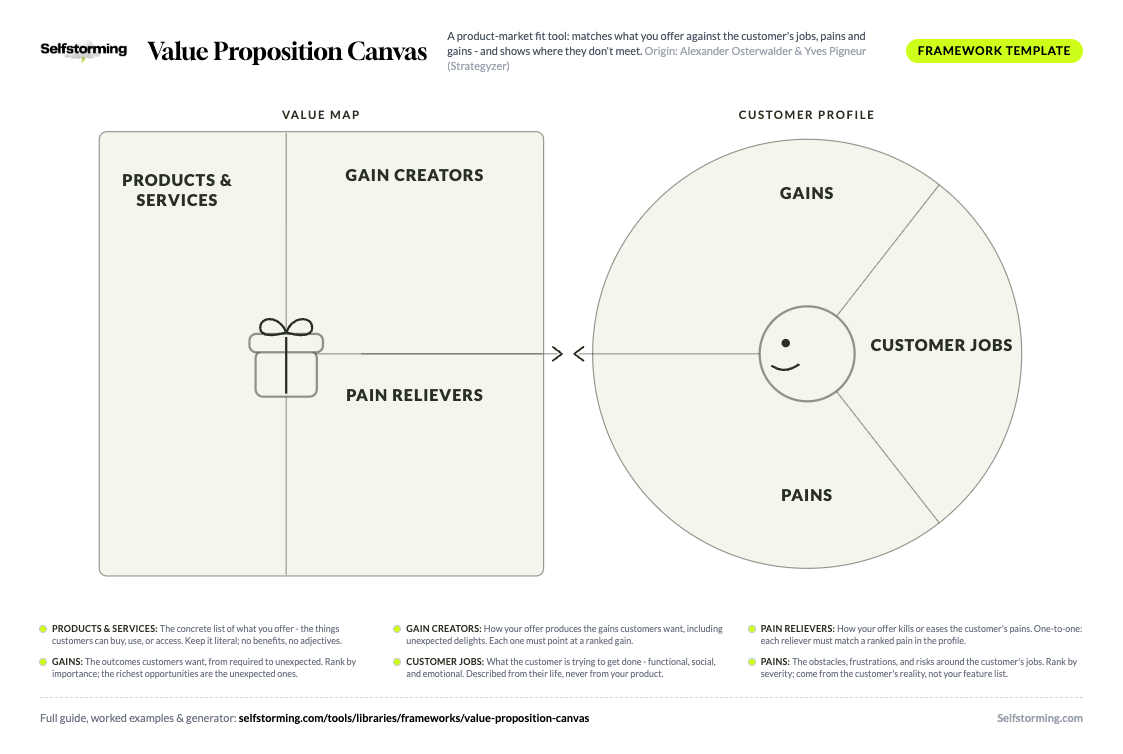
Print it. Fill it in.
The Value Proposition Canvas as a printable A4 worksheet - write straight into the framework, on paper or in any PDF app.
Download the PDF templateKnowledge Worth Paying For
A working library of brand strategy frameworks - with worked examples on real brands, sources, and decision criteria. Not vibes.
One good deck covers the subscription. The rest is profit.
Two halves, one rule. The customer profile (a circle) maps Customer Jobs (what they're trying to get done), Pains (what gets in the way), and Gains (the outcomes they want). The value map (a square) maps your Products & Services, Pain Relievers, and Gain Creators. Fit happens when your relievers and creators address the pains and gains the customer actually ranks as important - and it's confirmed by evidence, not by drawing it. Use it to design and test value propositions, not to congratulate yourself on the one you already have.
Notion
All-in-one workspace SaaS (USA, founded 2013)A clean illustration of fit found through the emotional and social jobs, not just the functional one. Notion's relievers target the real pain - tool sprawl - while its strongest gain creator (a workspace you're a little proud to show off) hits a social gain most productivity tools ignore entirely.
Monzo
Digital challenger bank (UK, founded 2015)Shows the Canvas working in a category - banking - where the real jobs are emotional and the incumbents only served functional ones. Monzo's pain relievers attack anxiety and opacity, and its gain creators turn a chore into something people genuinely talk about.
Duolingo
Language-learning app (USA, founded 2011)A case where the most valuable gain creator is purely emotional and where the framework's blind spot - asserting fit without behaviour - is answered by relentless testing. Duolingo's relievers attack the real pain (giving up), and its gamified gain creators are validated by usage data, not opinion.
Notion, Monzo, Duolingo - filled in, line by line. Unlock to read them.
Notion (All-in-one workspace SaaS (USA, founded 2013))
A clean illustration of fit found through the emotional and social jobs, not just the functional one. Notion's relievers target the real pain - tool sprawl - while its strongest gain creator (a workspace you're a little proud to show off) hits a social gain most productivity tools ignore entirely.
Customer Jobs: Functional: organise notes, tasks, docs, and wikis in one place. Social: have a workspace that looks considered, not chaotic. Emotional: feel in control of work instead of buried in it.
Pains: Severe: context-switching across five disconnected apps. Moderate: rigid tools that don't bend to how the team actually works. Mild: messy, ugly shared docs.
Gains: Required: notes and tasks that don't get lost. Desired: one tool the whole team adopts. Unexpected: a workspace people enjoy building and showing others.
Products & Services: A flexible block-based editor, databases, wikis, shared workspaces, and a template gallery.
Pain Relievers: Replaces several tools with one, so context-switching drops. Blocks bend to any workflow instead of forcing a rigid structure.
Gain Creators: Templates and a clean aesthetic make a workspace people are proud to share - turning an internal tool into a social gain and a viral growth loop.
Monzo (Digital challenger bank (UK, founded 2015))
Shows the Canvas working in a category - banking - where the real jobs are emotional and the incumbents only served functional ones. Monzo's pain relievers attack anxiety and opacity, and its gain creators turn a chore into something people genuinely talk about.
Customer Jobs: Functional: manage day-to-day money and payments. Social: not be the person who can't split the bill. Emotional: feel calm and in control instead of anxious about overspending.
Pains: Severe: nasty surprise fees and no real-time view of spending. Moderate: slow, painful support from a legacy bank. Mild: clunky, dated banking apps.
Gains: Required: payments that just work. Desired: clear visibility of where money goes. Unexpected: a bank that feels like it's on your side.
Products & Services: A mobile-first current account, instant spending notifications, budgeting pots, and easy bill-splitting.
Pain Relievers: Real-time notifications and no hidden fees remove the surprise-and-anxiety pain that defined traditional banking.
Gain Creators: Pots, instant splits, and a friendly tone create the unexpected gain - banking that feels supportive - which drove word-of-mouth growth.
Duolingo (Language-learning app (USA, founded 2011))
A case where the most valuable gain creator is purely emotional and where the framework's blind spot - asserting fit without behaviour - is answered by relentless testing. Duolingo's relievers attack the real pain (giving up), and its gamified gain creators are validated by usage data, not opinion.
Customer Jobs: Functional: learn a new language. Social: be able to say you're learning Spanish. Emotional: feel a sense of progress and not like a quitter.
Pains: Severe: losing motivation and abandoning the course after two weeks. Moderate: lessons that feel like school. Mild: the cost of classes or tutors.
Gains: Required: actually retain some of the language. Desired: a habit that sticks. Unexpected: looking forward to a daily 'chore'.
Products & Services: Bite-sized gamified lessons, streaks, leaderboards, reminders, and a free tier.
Pain Relievers: Five-minute lessons and streaks attack the severe pain - quitting - by lowering the bar to show up every day.
Gain Creators: Gamification, streak anxiety, and that pushy owl create the unexpected gain of wanting to come back daily - all validated by engagement data, not assertion.
1. Products & Services
What do we actually offer the customer - the concrete list of products and services they can buy, use, or access?
The plain inventory of what you offer, the things customers can build their jobs around. This block is deliberately literal: list what you sell before you make any claim about what it does. It's the foundation the relievers and creators are supposed to deliver on - and it's the easiest block to overstate.
Good answer: A weekly recipe box, a 20-minute meal app, and a same-day grocery top-up service. Each item is a concrete thing the customer receives - not a benefit, not a promise, just the offer itself.
Wrong answer: "Effortless, healthy, joyful dinners." That's a benefit dressed up as a product. This block lists what you ship; the magic adjectives belong in the relievers and creators - if they're earned.
2. Gain Creators
How does our offer produce the outcomes the customer wants - including delights they didn't expect?
How your products and services create the gains customers care about. Like relievers, they must connect to the gains in the circle. The strongest gain creators deliver an unexpected gain - the thing the customer didn't ask for but now can't live without - because that's what makes a value proposition impossible to commoditise.
Good answer: A weekly "sneaky veg" recipe engineered so kids eat greens without noticing. It creates the unexpected gain - kids asking for seconds of a vegetable - that no competitor's faster-delivery promise can match.
Wrong answer: Claiming gains the offer can't actually deliver. "Makes you a better parent" sounds great and means nothing if no feature produces it. A gain creator without a mechanism behind it is marketing, not value.
3. Pain Relievers
How exactly does our offer kill, reduce, or soften the specific pains the customer ranked as important?
How your products and services eliminate or ease the customer's pains. The discipline is one-to-one: each pain reliever must point at a real pain in the circle. A reliever for a pain nobody listed is a solution looking for a problem, and the Canvas exists to expose exactly that.
Good answer: A live-checked box guaranteeing no missing ingredients, with an instant credit if one's wrong. It points straight at the severe pain - ruined dinner - rather than at a pain the team wished the customer had.
Wrong answer: Relieving pains the customer didn't rank. A clever feature that soothes a minor annoyance while ignoring the severe pain is effort spent in the wrong corner. Match relievers to ranked pains, not to what's fun to build.
4. Gains
What outcomes and benefits would genuinely delight the customer - including the ones they'd never think to ask for?
The positive outcomes customers want, from the bare minimum they expect to the unexpected delights that would thrill them. Gains range from required (it must do this) to desired, expected, and unexpected. The richest opportunities usually hide in the unexpected ones.
Good answer: Expected: the recipe tastes good. Desired: it's faster than ordering in. Unexpected: the kids ask for seconds of a vegetable. The unexpected gain is what turns a satisfied customer into a loud one.
Wrong answer: Treating gains as the opposite of pains. "No missing ingredients" is removing a pain, not creating a gain. A gain is a positive the customer would brag about, not just the absence of something bad.
5. Customer Jobs
What is the customer actually trying to get done - functionally, socially, and emotionally - in their own world, not in relation to our product?
The tasks, problems, and needs customers are trying to satisfy. They come in three kinds: functional (the practical task), social (how they want to be seen), and emotional (how they want to feel). The hard discipline is describing jobs from the customer's life, never from your product's point of view.
Good answer: Functional: get a healthy meal on the table after a 10-hour shift. Social: look like a parent who has it together. Emotional: stop feeling guilty about another takeaway. The same dinner solves three different jobs at once.
Wrong answer: "The customer wants to use our app." That's not a job - it's your product in disguise. Nobody wakes up wanting to use your app; they want the thing it does. Describe the job, not the tool.
6. Pains
What annoys, blocks, frustrates, or scares the customer before, during, and after they try to get the job done?
The bad outcomes, obstacles, and risks customers experience around their jobs. Pains include undesired costs, frustrations, blockers, and the risk of things going wrong. The useful move is to rank them: which pains are severe and which are merely mildly annoying.
Good answer: Severe: the meal kit arrives with a missing ingredient and dinner is ruined at 7pm. Moderate: too much packaging to recycle. Naming severity tells you which pain is worth building a reliever for first.
Wrong answer: Listing pains your product happens to solve. If your pains conveniently mirror your feature list, you reverse-engineered the customer to justify the product. Pains come from the customer's reality, even the ones you can't fix.
Decide your starting point: A blank canvas and a wall of sticky notes is one way in, but not the fastest. Right here on Selfstorming you can pull customer and market context and a structured first pass, or generate a first-draft Value Proposition Canvas in minutes. Treat that draft as a hypothesis to test, never as the answer - then run it through the steps below and validate it against real customers. Workshop-from-scratch and AI-draft-then-test are both valid; most teams move faster starting from a draft.
Pick one customer segment and name it precisely: The Canvas works one segment at a time. "Busy parents" is too broad; "working parents of under-10s who feel guilty about weeknight takeaways" is a profile you can actually research. Blend two segments and you'll design a value proposition that fits neither.
Fill the circle before the square: Map customer jobs, pains, and gains before you look at your product. Starting with the value map biases everything - you'll list the pains your features solve and the jobs your product does, which is the exact trap the Canvas was built to catch.
Cover all three job types: For jobs, deliberately ask the functional, the social, and the emotional version. Teams over-index on functional jobs and get out-competed by whoever understood how the customer wanted to feel and be seen. The emotional job is often the real one.
Rank pains and gains by importance: Don't just list them - score them. Which pains are severe, which gains are must-haves? A value proposition that nails three trivial pains and misses the one severe pain will lose. The ranking is what turns the Canvas from a brainstorm into a priority list.
Build the value map against the ranked circle: Now fill products & services, pain relievers, and gain creators - drawing a line from each reliever to a ranked pain and each creator to a ranked gain. Anything in the square with no line to the circle is a feature with no customer behind it. Cut it or question it.
Test fit with real customers, don't declare it: A finished Canvas is a set of assumptions, not a victory. Interview customers, run experiments, watch behaviour. Confirm that the pains and gains are real and ranked correctly, and that your relievers and creators actually land. Most teams stop here and assume fit - that's the single biggest mistake.
Iterate the proposition, not the diagram: Use what you learn to change the offer, not to make the picture prettier. Drop relievers that didn't matter, double down on the unexpected gain that did, rewrite the proposition. The Canvas is a means to a better value proposition - the moment it becomes wall art, it's done its harm.
Best for: Designing, sharpening, and testing a value proposition for a specific customer segment - lining up what people want against what you offer and finding the gaps. / Mapping a whole business model, competitive structure analysis, or internal brand identity. The Canvas zooms into one offer-and-segment pair, not the wider picture.
Output: Two completed halves (customer profile and value map) with a clear line from each pain reliever and gain creator to a ranked pain or gain, plus a list of assumptions to test. / A pretty wall poster of unranked guesses declared a 'fit' with no customer evidence behind it. That's a brainstorm, not a Canvas.
Time to complete: A workshop for the first draft, then days-to-weeks of customer research and experiments to confirm fit. The drawing is fast; the validation is the real work. / A 30-minute fill-it-in-and-forget-it session. The Canvas is worthless if you skip the testing phase that follows.
vs Business Model Canvas: The Value Proposition Canvas zooms into two blocks of the Business Model Canvas (value propositions and customer segments) in fine detail. Better when the question is whether your offer truly fits the customer. / The Business Model Canvas (same authors) maps the whole business - channels, revenue, costs, partners. Use it when the question is whether the business model works, not just the offer.
vs Brand Ladder: The Value Proposition Canvas is research-driven and offer-specific, grounded in jobs, pains, and gains. Better for product and proposition design backed by customer evidence. / The Brand Ladder climbs from features to benefits to emotional and higher-order meaning for a brand. Use it for brand messaging and emotional positioning, not offer-customer fit.
vs Positioning Statement: The Value Proposition Canvas is the discovery and design tool - it works out what the value actually is for whom. Better as the upstream thinking before you write anything market-facing. / A Positioning Statement is the crisp downstream output - the single claim you take to market. Use it to crystallise what the Canvas discovered into a sentence.
The Value Proposition Canvas was created by Alexander Osterwalder and Yves Pigneur with Greg Bernarda, Alan Smith, and Trish Papadakos, and published in their 2014 book Value Proposition Design: How to Create Products and Services Customers Want (Wiley, the Strategyzer series). It was built as a companion to their earlier hit, the Business Model Canvas - the Value Proposition Canvas zooms into two of that model's nine blocks (value propositions and customer segments) in much finer detail. Its customer-side thinking draws openly on the Jobs-to-be-Done tradition associated with Clayton Christensen and Tony Ulwick, reframing customers as people trying to get jobs done rather than as demographic profiles. Strategyzer continues to publish and teach the tool, and it has become a staple of lean startup, product management, and design-thinking practice.
The most common criticism is that the Canvas is dangerously easy to fill with wishful thinking - teams write the pains and gains their product happens to solve, draw the two halves so they line up, and declare "fit" without ever leaving the building. Practitioners (including Strategyzer itself) stress that every item on the Canvas is an assumption until customer evidence confirms it, and that filling it in is step one, not step ten. Fit is asserted on paper but only proven through interviews, experiments, and observed behaviour, which is the part most teams skip. It also breaks down when multiple customer segments are crammed into one profile. The honest way to use it: as a structured hypothesis you take out and test, not as proof you were right - and one Canvas per segment, never a blend.
What is the Value Proposition Canvas?
The Value Proposition Canvas is a tool for designing and testing whether your offer actually fits what customers want. It has two halves: a customer profile (a circle mapping the customer's jobs, pains, and gains) and a value map (a square mapping your products & services, pain relievers, and gain creators). "Fit" happens when your relievers and creators address the pains and gains the customer ranks as important - and it's confirmed by real customer evidence, not by drawing the two halves to match.
Who created the Value Proposition Canvas?
It was created by Alexander Osterwalder and Yves Pigneur, with Greg Bernarda, Alan Smith, and Trish Papadakos, and published in their 2014 book Value Proposition Design (Wiley / Strategyzer). They built it as a companion to their earlier Business Model Canvas, zooming into the value-propositions and customer-segments blocks in detail. The customer-side thinking draws on the Jobs-to-be-Done tradition associated with Clayton Christensen and Tony Ulwick.
What is the difference between the Value Proposition Canvas and the Business Model Canvas?
They're by the same authors and work together. The Business Model Canvas maps a whole business across nine blocks - customer segments, channels, revenue, costs, partners, and so on. The Value Proposition Canvas zooms into just two of those blocks - value propositions and customer segments - in much finer detail. Use the Business Model Canvas to design the business; use the Value Proposition Canvas when the specific question is whether your offer truly fits the customer.
What does "fit" mean in the Value Proposition Canvas?
Fit is the alignment between your value map and the customer profile - when your pain relievers ease the pains the customer actually ranks as important and your gain creators produce the gains they actually want. Crucially, fit is something you discover and confirm with evidence, not something you draw. Strategyzer describes progressive stages, including problem-solution fit (confirmed customers care) and product-market fit (confirmed the market wants it). A Canvas where the two halves line up on paper is a hypothesis of fit, not proof of it.
What are customer jobs, pains, and gains?
On the customer profile, jobs are what the customer is trying to get done - functional (the practical task), social (how they want to be seen), and emotional (how they want to feel). Pains are the obstacles, frustrations, and risks around those jobs. Gains are the positive outcomes they want, from the bare minimum they expect to unexpected delights. The discipline is to describe all three from the customer's life, never from your product, and to rank pains and gains by importance.
Can you use one Value Proposition Canvas for multiple customer segments?
No - and trying to is a classic mistake. Different segments have different jobs, pains, and gains, so a single profile crammed with two audiences produces a value proposition that fits neither cleanly. Build one Canvas per segment. If two groups genuinely share the same important jobs and pains, you may be able to treat them as one, but that's a finding to confirm, not an assumption to start from.
Does the Value Proposition Canvas work for B2B?
Yes, and it's especially useful in B2B because there are usually several people in the buying decision, each with their own jobs, pains, and gains. The end user, the economic buyer, and the champion often want very different things. The clean way to handle it is a separate customer profile for each key role in the buying group, then check that your value map relieves the pains and creates the gains for the roles that actually decide. A single blended B2B profile hides exactly the tension you need to design for.
A product-market fit tool: matches what you offer against the customer's jobs, pains and gains - and shows where they don't meet.
The Canvas has two halves and one rule. On one side, a circle: the customer profile - the jobs people are trying to get done, the pains in the way, the gains they want. On the other, a square: the value map - your products and services, the pain relievers, the gain creators. The rule is that the square has to earn the circle. Every pain reliever must kill a pain that's actually on the customer's list; every gain creator must produce a gain someone actually wants. Fit isn't something you draw - it's something you discover, usually by talking to people and finding out half your boxes were wishful thinking. This page walks through each block, the question that fills it, and how to tell a Canvas that found real fit from one that just asserted it.
Related Frameworks
Playing to Win
Five linked choices, top to bottom: Winning Aspiration (what winning looks like, for whom), Where to Play (the specific market, segment, geo
OKRs
One Objective (qualitative, ambitious, memorable - the hill worth taking) plus three Key Results (numeric, measurable, with zero grey area -
SWOT Analysis
Four boxes, two axes: Strengths and Weaknesses are internal and controllable, Opportunities and Threats are external and mostly not. Left si
Eisenhower Matrix
Score every task on two axes: important (does it matter to your goals?) and urgent (does it need attention now?). That gives four boxes. Do